


Shoppers who click on a Google Shopping ad are usually ready to buy, which makes it one of the highest-intent traffic sources for ecommerce brands. But this is also where most people misunderstand how performance actually works. Success here doesn’t come from clever, creative, or viral hooks. It comes from effective Google Shopping optimization, and more specifically, from the accuracy and clarity of your product feed.
The feed is the engine behind every listing, even if you never see it directly. When your data is clean, well-structured, and aligned with how people search, your products surface in the right moments. When it’s not, they quietly lose visibility, no matter how much you spend.
At Marpipe, we’ve seen this play out across fast-growing stores. Brands that invest in Google Shopping optimization at the feed level consistently outperform those that focus only on campaigns. And our feed management platform has helped 7,100+ brands turn messy product data into structured, accurate inputs that Google can actually use.
How Google Shopping Works
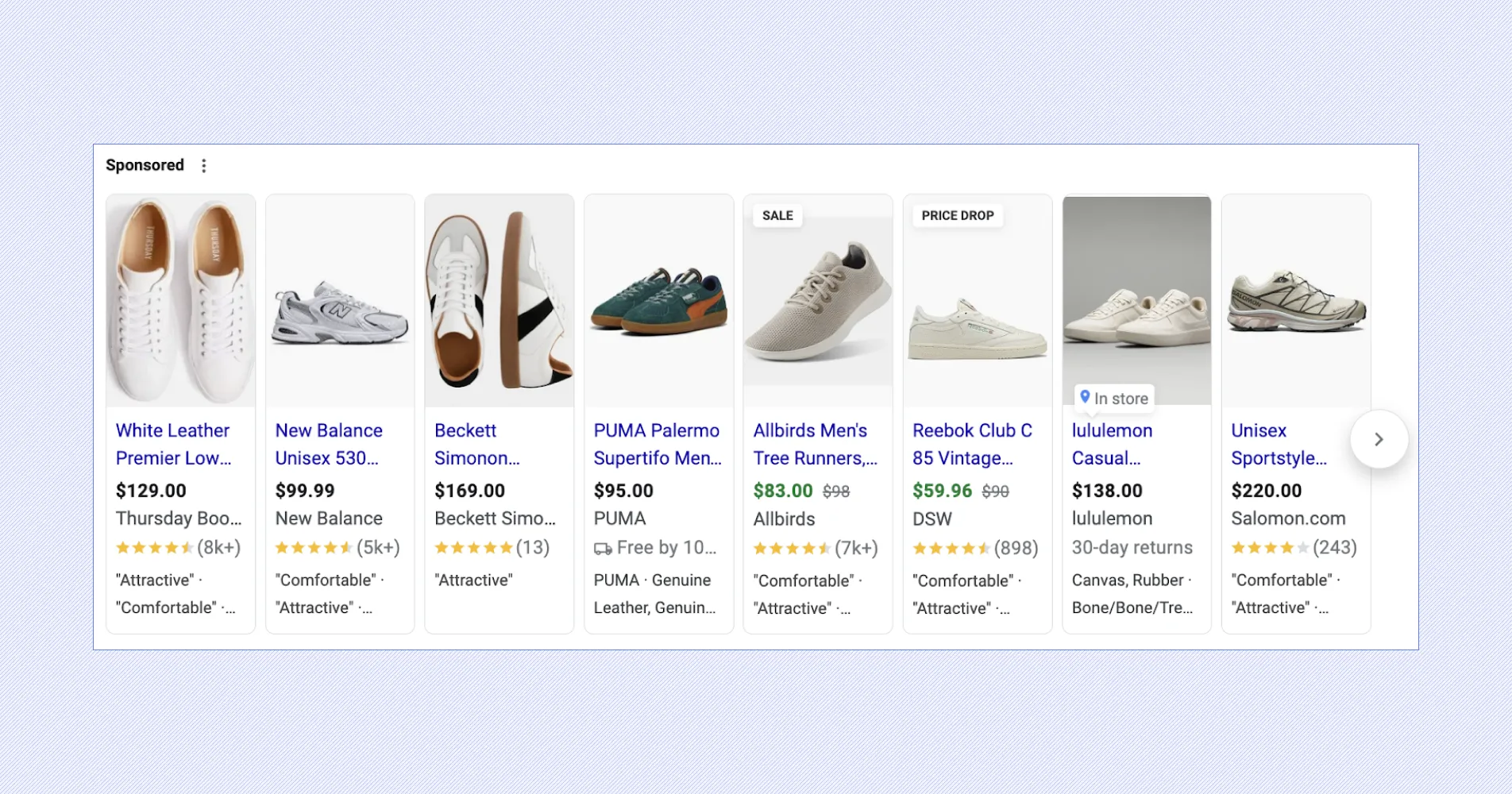
Google Shopping is entirely feed-driven, which makes Google Shopping optimization quite different from social ads. Instead of targeting audiences or writing ad copy, Google relies on your product data to decide when and where your listings appear. That includes titles, descriptions, images, pricing, and availability. If your feed is clean and structured, your products show up in the right searches. If not, they lose visibility.
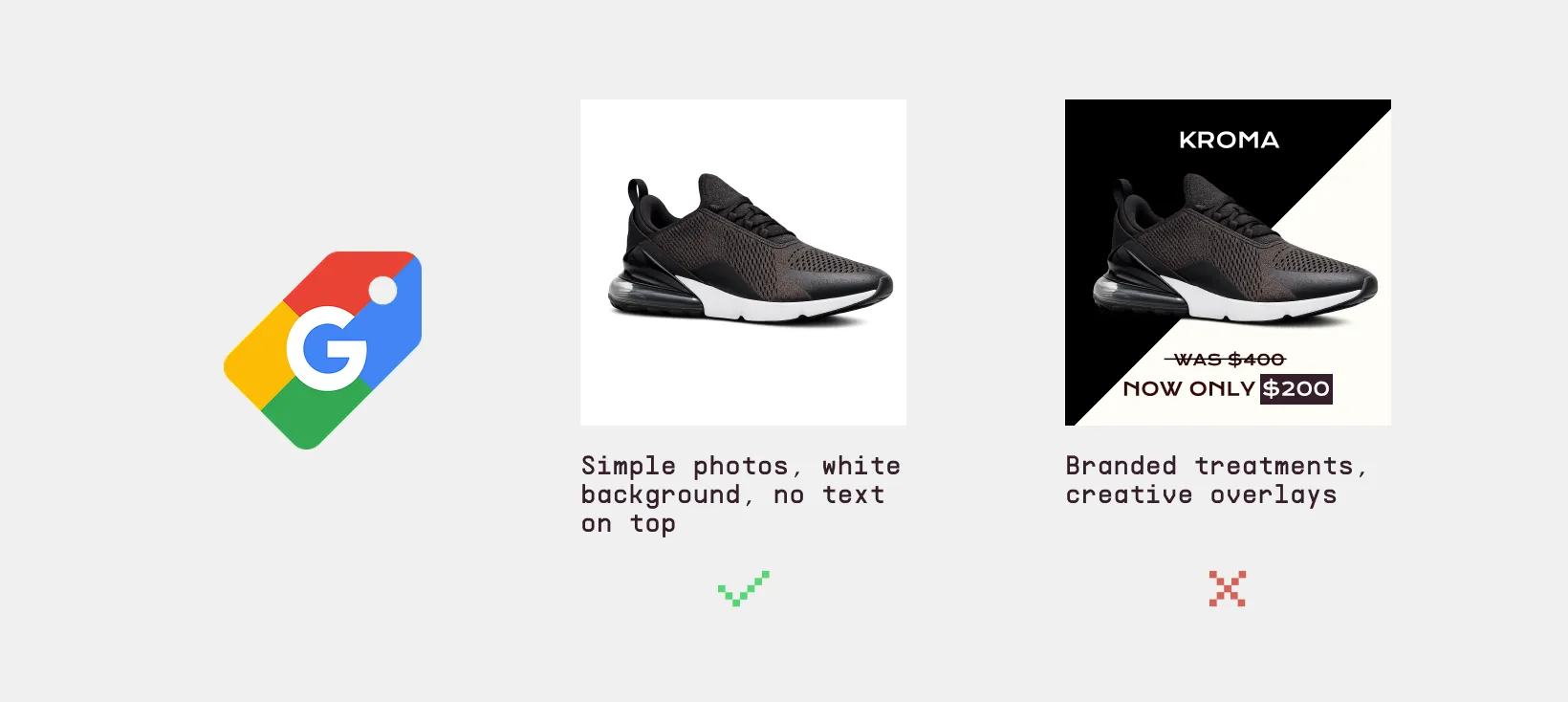
This matters because 70% of shoppers who use social media still turn to Google to research before buying. At that point, clear and accurate product data wins. Google favors consistency over creativity, so simple, well-structured listings perform best.
How to Optimize Google Shopping Ads: 7 Core Tactics That Actually Move ROAS
According to research from Search Engine Journal, merchants who regularly improve their Shopping feeds often see a strong increase in their impressions, click-through rate (CTR) and return on ad spend (ROAS). You can't skip feed hygiene; it's what makes the difference between getting traffic that wants to buy something and missing it altogether.
Once you understand how the system works, the next step is building a Google Shopping Ads strategy that actually improves performance over time.
1. Turn Your Product Feed Into Your Targeting Engine
Google Shopping does not rely on keywords the way search campaigns do. Instead, it uses your product feed to decide when your ads appear. That means your targeting is only as good as the data you provide. If your titles, categories, or attributes are unclear, Google will match your products to the wrong searches or miss opportunities entirely.
The goal is simple: make your product data precise, structured, and aligned with real search behavior. When your feed is clean and detailed, Google can place your products in more relevant auctions, which leads to better traffic and more consistent performance.
It's surprising how simple the problems marketers have with feeds are. Products may be flagged and have limited reach if they don't have GTINs. Titles that are too similar or too general can keep products from ranking for search terms that show high intent. Images that aren't very good lead to fewer clicks or even outright disapprovals. Even vague descriptions can hurt a campaign if they don't use the same words that shoppers use when they search. If you want a deeper breakdown of what your feed should include, this guide covers the key elements Google uses to match your products with search queries.
Put this into practice:
- Build clear, structured titles: Use a consistent format like brand + product type + key attributes. Keep important details early so Google can quickly understand what you’re selling. For example, “Nike Air Max 270 Men’s Running Shoes Black Size 10”.
- Use accurate categories and product types: Select the closest Google category and create a logical product type path. Avoid generic labels that weaken matching.
- Include all key identifiers: Add GTINs, MPNs, and brand wherever possible. These help Google correctly identify your products and improve placement.
- Write useful, specific descriptions: Focus on real product details like material, size, and use case. Skip vague marketing language that doesn’t help with matching.
- Refine based on actual search data: Check search terms regularly and adjust your feed to better reflect how customers are finding and buying your products.
2. Segment Products Based on Performance and Value
Not all products should be treated the same. If everything sits in one campaign with the same bid, you lose control over where your money goes. The goal is to group products in a way that reflects business value, not just catalog structure. This gives you control to push what’s profitable and limit spend on what’s not. Without segmentation, even strong products can get buried while weaker ones take up the spending.
Put this into practice:
- Identify products with strong conversion rates or revenue and isolate them so you can bid more aggressively.
- Group products by margin or price range: High-margin items can handle higher bids, while low-margin ones need tighter control to stay profitable.
- Tag products by performance (best sellers, low performers, seasonal) so you can quickly adjust campaigns.
- Create different campaign layers to control how traffic flows and which products get priority.
- Adjust bids based on actual performance: Increase bids on products with strong ROAS and reduce spend on those that consistently underperform.
3. Use Search Term Data to Cut Waste and Find Opportunities
Search term data shows the exact queries people used before clicking, which makes it one of the most useful levers for improving performance. Left unchecked, irrelevant queries quietly drain the budget. On the flip side, strong queries often go underutilized. For this approach, simply remove what doesn’t convert and reinforce what does.
Put this into practice:
- Scan search terms on a set schedule - weekly reviews are enough to catch patterns
- Add negatives for terms that clearly don’t match your product to block low-intent queries early. For example, if you’re selling premium leather boots, adding negatives like “cheap boots”, “free boots”, or “boot repair near me” helps you save on clicks from people who are not buying.
- Look for terms that drive sales, not just clicks, and make sure your feed reflects them.
- If certain words keep showing up in conversions, work them into titles or attributes.
- Separate brand vs non-brand queries helps you see what’s truly driving growth. For example: “Nike Air Max 270” → high conversions vs “running shoes” → low conversions
4. Use Bidding to Capture More of What’s Already Working
Bidding is where you scale results, not where you figure things out. Once your feed and segmentation are clean, you can trust the data enough to push harder on what performs. The clearer your product structure, the easier it is to adjust bids with confidence instead of guessing. Strong bidding strategies are a core part of Google Shopping campaign optimization, helping you prioritize what’s already working.
Put this into practice:
- Consider increasing bids on products with strong ROAS
- Cut back on products that generate clicks but no sales.
- Use segmented product groups to adjust bids at scale.
- Watch impression share for missed opportunities - if top products aren’t showing enough, bidding is likely the limiter.
- Scale gradually and avoid sharp increases that can spike costs without returns.
5. Optimize Product Pages to Match Click Intent
Even with strong ads, poor landing pages will kill performance. If the page doesn’t match what the user expected, they leave. That gap between ad and page is where most conversions are lost.
Feed consistency plays a role here. When your product data is clean and structured properly, it becomes easier to keep naming, attributes, and messaging aligned across ads and landing pages. This level of detail has a direct effect on how people shop. According to OptinMonster, 88% of customers say detailed product pages are crucial when making a purchase, which aligns with what Marpipe users observe: better feeds mean better performance.
Put this into practice:
- Match product titles across feed and page so users immediately recognize the product.
- Show key details upfront (price, availability, and main features)
- Use clear product images.
- Turn your catalog into short, engaging videos automatically with Product Level Video Maker.
- Make sure key features are easy to find and clearly explained according to what users searched for.
6. Build Product Sets for Smarter Campaigns
Campaign performance depends on how you group products. If everything sits in one large group, you lose control over bidding, budget, and visibility. Strong products compete with weak ones, and your data becomes harder to read. Product sets fix that by giving you clear, manageable segments that reflect how your business actually works.
Instead of organizing by default categories, the focus should be on intent and performance. Group products in a way that lets you control spend, test ideas, and scale what’s working without affecting the rest of your catalog.
Put this into practice:
- Separate top performers, average products, and low performers so each group can be managed differently.
- Use factors like margin, price range, or inventory levels to build more meaningful product sets by business value.
- Isolate seasonal or promotional products to prevent short-term campaigns from affecting your core performance data.
7. Standardize Feed Data Across Channels
Running ads on multiple platforms sounds simple until your product data starts drifting. One version of a product on Google, another on Meta, different naming, missing attributes, inconsistent pricing. That disconnect leads to uneven performance, harder troubleshooting, and wasted spend. The goal is to treat your feed as a single source of truth. When every platform pulls from the same clean, structured data, your ads stay consistent and easier to optimize.
- Clean, organize, and push your feed to multiple platforms from one place, or use a centralized tool like our Feed Manager
- Use generative AI to scale creative content without losing quality
- Standardize key fields across all products: Titles, descriptions, pricing, and availability should follow the same format everywhere.
- Keep feeds updated so pricing, stock, and product details stay accurate across platforms.
How Marpipe Empowers Your Google Shopping Strategy
Marketers need the kind of control over their feeds that Marpipe gives them. Most feed tools stop at the data. Marpipe lets you manage your feeds and the creative they power in one place.
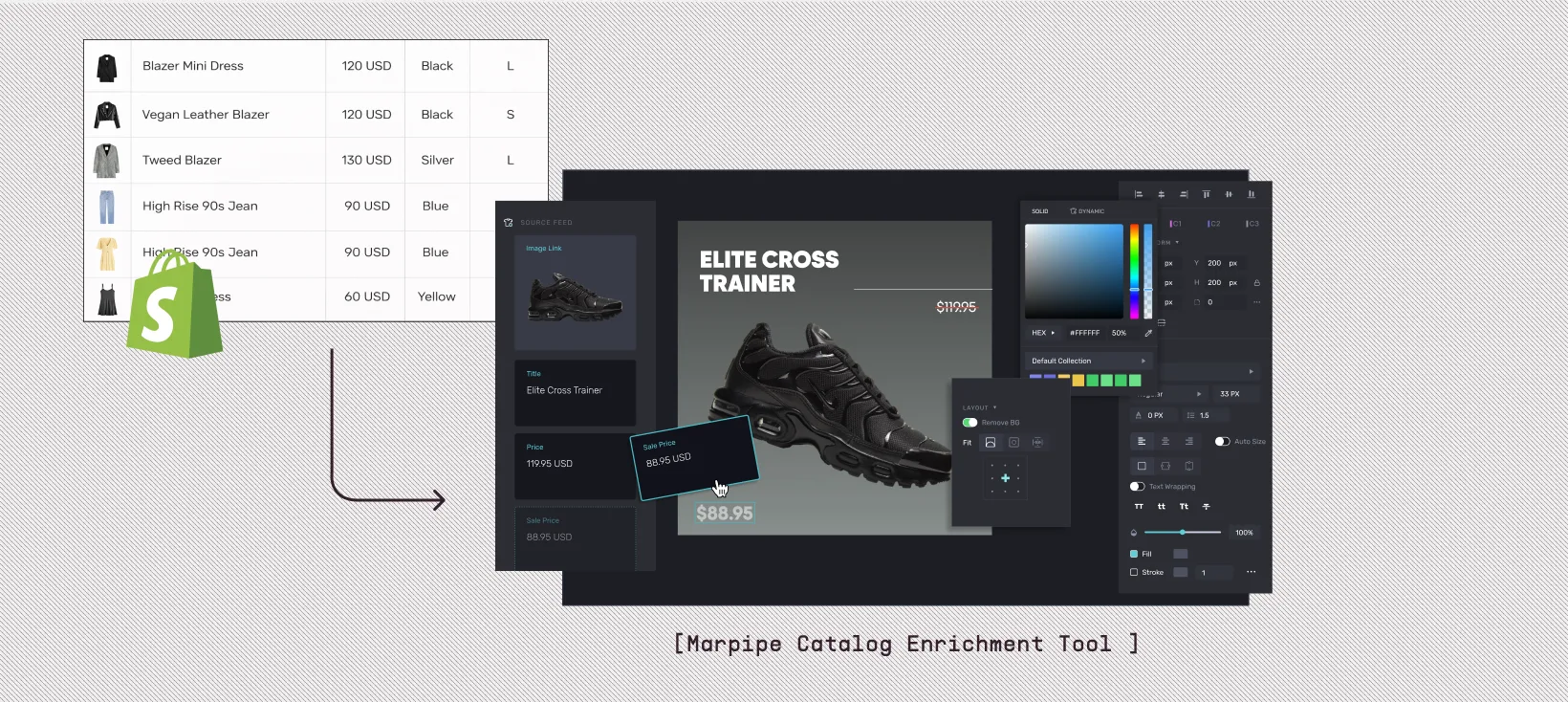
The platform lets you make dynamic titles that combine the original product name with things like brand, color, or material. This makes sure that every listing is optimized for search. It also lets marketers make their own labels so they can put products into groups like "high-margin," "seasonal," or "clearance," and then spend money on ads based on those groups. Marpipe is also very good at choosing images. A lot of stores upload more than one picture of a product, but Google always shows the first one in the feed. You can choose which image shows up first with Marpipe. For instance, you can choose the second image of a sweater instead of the default.
These Google Shopping optimization features, such as dynamic titles, labels, formatting, and image control, give marketers a powerful set of feed management tools that are easy to use. They simplify Google Shopping ads optimization by giving you direct control over how products appear and perform, without adding complexity or extra tools. If you’re interested, book a demo with us here.
How to Optimize Google Shopping Campaigns on Marpipe
The first step for people who use Shopify is to download the Marpipe Shopify app. When you install the app, it syncs your store data with Marpipe. After that, you can choose Google from the channels list and edit your feed. You should focus on custom labels first because they are the basis for grouping campaigns. Then, you can use dynamic title creation to make sure your listings are as easy to find as possible in search engines. You can make the feed live in the Merchant Center after you've made all the changes.
The process is just as easy for retailers who don't use Shopify. Marpipe makes SFTP URLs that you can connect directly to Google Merchant Center. This gives you the same level of control and customization.
Check out our guide on What Is a Product Feed for a more in-depth look at the basics of feeds.
Why Retailers Are Adopting Marpipe's Feed Management Platform
A few months after Marpipe's feed management tool came out, adoption has grown quickly. Many of Marpipe's current creative automation clients have added the feed management tool to their workflows. They use Marpipe to manage both feeds and creative work on the same platform.
This gives them an edge over their competitors. Most brands pay for a feed tool and a creative tool separately, then keep the two in sync by hand. Marpipe runs both off the same feed, so changes to product data flow straight into the ads. That makes it especially appealing to retailers with big catalogs who want both control and speed.
Marpipe also combines feed management with its creative automation suite, giving marketers a single place to manage both their data and their creative work. This not only cuts costs but also makes workflows easier, so teams can focus on performance instead of infrastructure.
Why It’s Important to Keep Your Feed Clean
AI-driven search is changing how Google Shopping works. AI Overviews and conversational queries can now get product information straight from feeds. Placements are also growing on YouTube, Maps, and Discovery. A single feed now powers a much larger number of surfaces than ever before. If those feeds don't have enough information, products won't show up.
That change shows a bigger truth: Google Shopping is not the best place to try new things. It is the channel where operational discipline pays off. Brands that take care of their feeds consistently do better than those that don't think about feed management at all. Clean, optimized feeds are important now, and they will be the basis of visibility in the age of AI-driven commerce.
Marpipe makes it easier. The platform gives marketers full control with dynamic titles, custom labels, image control, and direct export to Merchant Center. If you want to get serious about Google Shopping optimization, the first thing you should do is start with your feed and let Marpipe take care of the rest.
Get started with Marpipe's product feed management today!
Frequently Asked Questions
How is Google Shopping different from Meta or TikTok ads?
Google Shopping works very differently from platforms like Meta or TikTok. On social platforms, brands rely heavily on creative design like bold text, colors, and storytelling visuals to grab attention. You can test multiple ad variations and see what drives clicks.
Google Shopping, on the other hand, focuses on clean product listings and structured data. The layout is standardized, and creativity is limited. Instead of flashy visuals, success comes from how well your product data matches what people are searching for.
What are custom labels, and why do they matter?
Custom labels are tags you add to your products in your feed to group them based on your business goals. Instead of relying only on standard categories, you can create your own groups like best sellers, high margin products, seasonal items, or clearance inventory.
They matter because they give you control over how you structure and optimize your campaigns. For example, you can increase the budget for high-performing products or reduce spending on slow movers. This makes your Google Shopping optimization more strategic, helping you focus on what drives the most revenue instead of treating every product the same.
Why does consistency matter more than creativity in Google Shopping?
Consistency matters because Google uses your product data to decide when to show your ads. Unlike social platforms, where creative design can drive performance, Google prioritizes accuracy and relevance.
If your feed is well-structured with clear titles, attributes, and images:
- Your products show up in more relevant searches
- You attract higher-quality traffic
Think of it like a search engine first, not a social feed. Clean data wins over flashy design.
How is Marpipe different from other feed management tools?
Marpipe stands out by connecting feed management directly to creative. Most feed tools, like Feedonomics, GoDataFeed and DataFeedWatch, stop at the data. They clean and format your feed, then hand it off, and you still need a separate tool to turn that feed into ads.
With Marpipe, the same feed that powers your Google Shopping listings also powers your catalog creative. A custom label that groups products as "clearance" can update your feed and send those same SKUs to a sale-badge design at the same time. There's no exporting, re-uploading or keeping two systems in sync.
That changes how teams scale. Instead of rebuilding segments in several places every time the catalog changes, you manage everything once and it carries through to every channel.
What tools can Marpipe replace for the Google Shopping optimization workflow?
Marpipe replaces multiple tools used for Google Shopping optimization by combining feed management, creative production, and testing in one platform. Instead of relying on tools like Feedonomics or DataFeedWatch,you can manage product data, optimize titles, and group products in the same place you build your ads. It also removes the need for separate creative tools by generating branded ads and testing variations directly from your feed. On top of that, Marpipe helps identify top-performing products and supports video creation. This all-in-one approach simplifies workflows, reduces costs, and makes Google Shopping optimization faster, more efficient, and easier to scale as your product catalog grows.
