


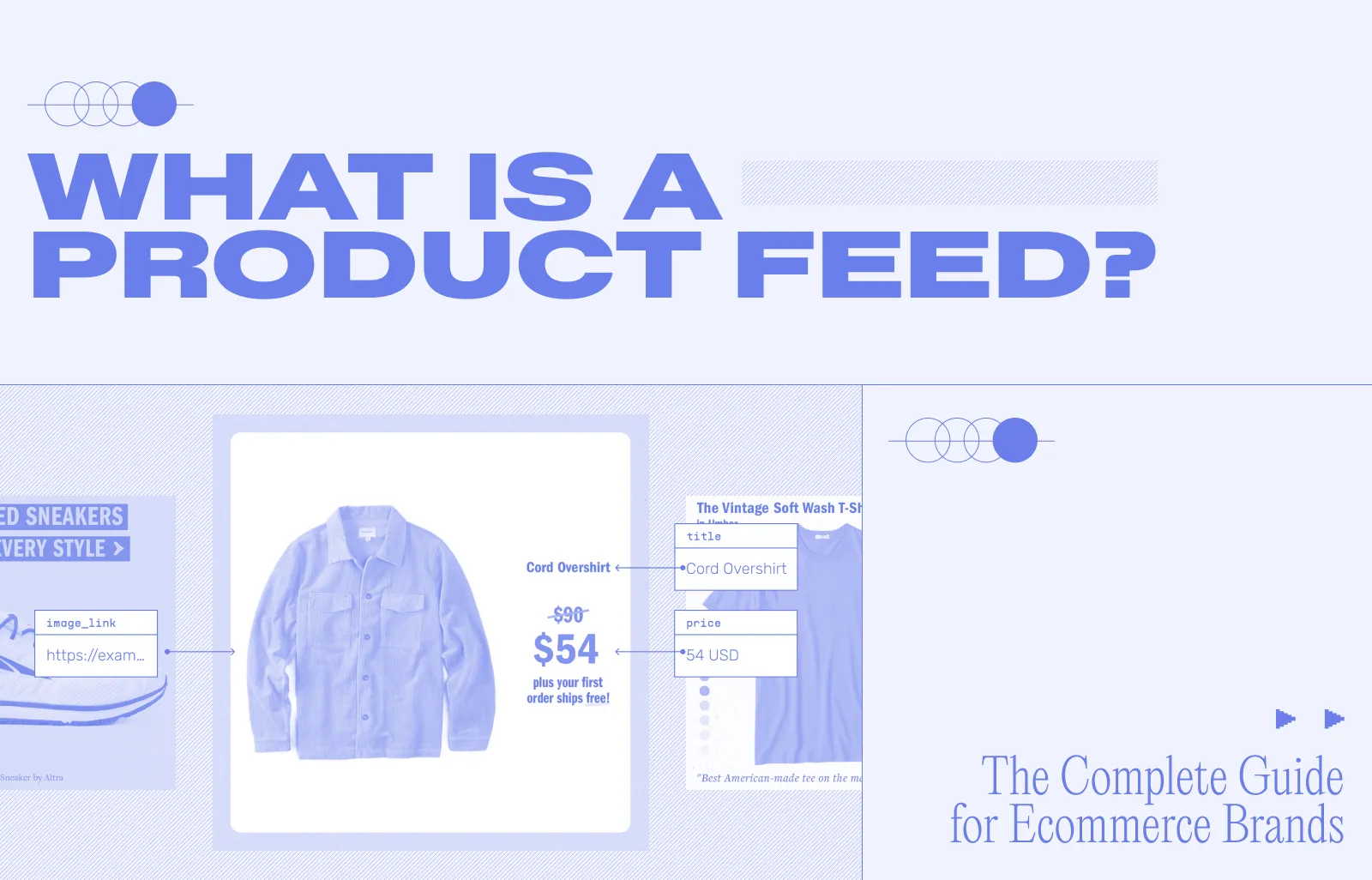
A product feed is a structured file that contains all the essential details about your products and sends that information to platforms where your products can be discovered, advertised, or sold.
In e-commerce, a product feed acts as the connection between your store and channels like Google Shopping, Meta ads, and online marketplaces. It allows those platforms to pull in your product data automatically instead of you uploading each item manually.
The data inside an e-commerce product feed serves as a single source of truth that makes distribution on platforms like Google, Amazon, Facebook, and Instagram much more efficient. With a single product feed, you can scale efforts across multiple sales channels while ensuring products are always showcased accurately, meaning more eyeballs, more traffic, and more purchases!
Product Feeds in Advertising: Why They Matter
Product feeds play a direct role in visibility, accuracy, and engagement across ecommerce advertising. They ensure your products are seen on the platforms where customers actively discover new items, while keeping details like pricing, availability, and descriptions consistent everywhere. When optimized properly, product feeds also improve engagement by making listings more appealing through better titles, images, and structured data.
Did you know that Google Shopping Ads account for over 85% of all ad clicks on Google Search and Shopping campaigns?
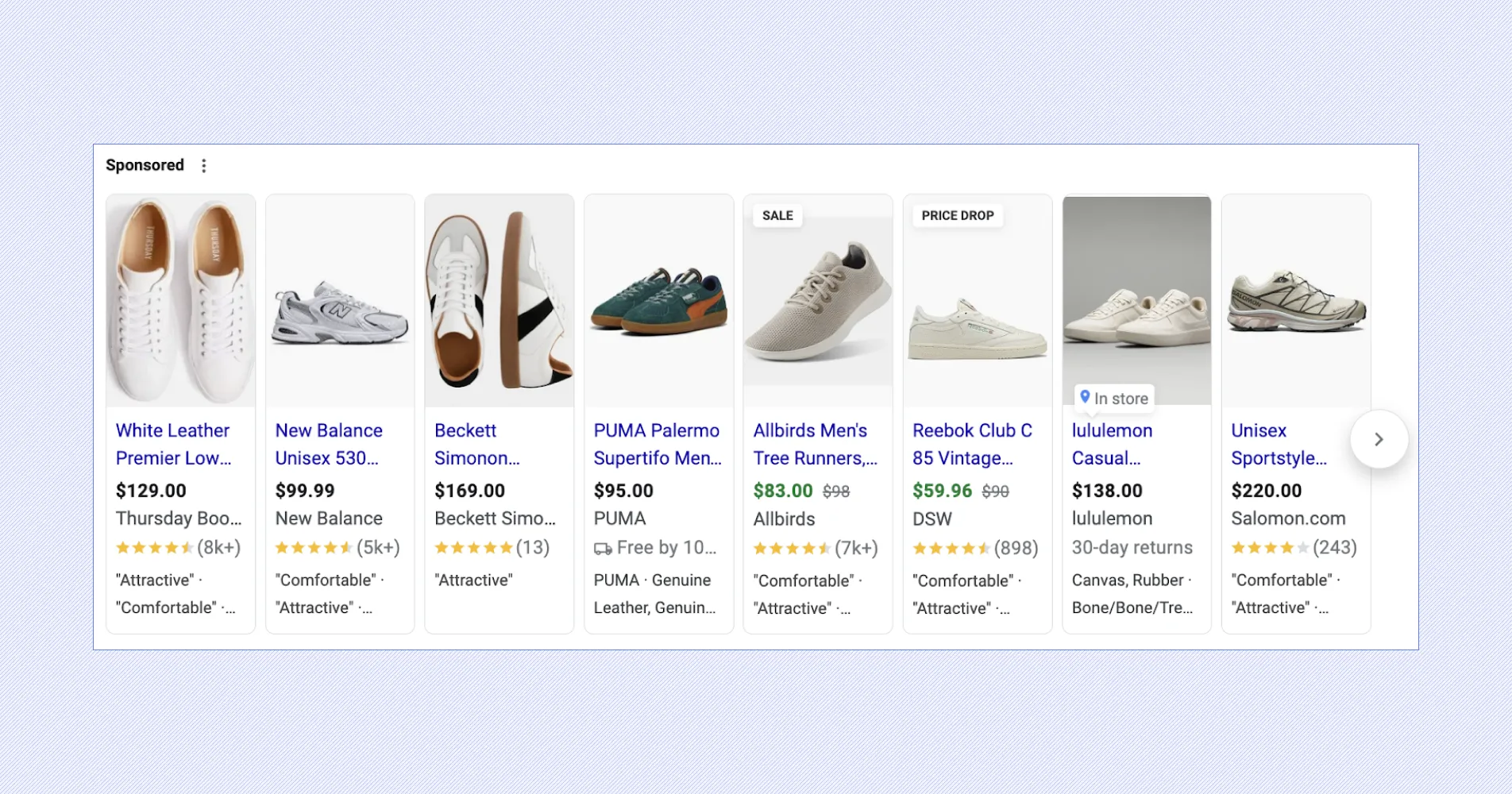
This is why e-commerce product feeds have become central to multichannel selling across Google, Meta, Amazon, and more. Each platform has different data requirements, from GTINs on Google to image quality on Meta, and adding UTM parameters allows you to track performance at the product level, refine campaigns, and improve ROI over time.
Key Components of a Product Feed
So what types of data can you commonly find inside e-commerce product data feeds?
- Titles: Clear and descriptive titles ensure customers know exactly what they're looking at. They should include essential details like brand and product type. For more insights on optimizing your product feed, explore our strategies for enhancing e-commerce marketing performance.
- Descriptions: Descriptions provide a deeper understanding of the product. A well-crafted description highlights features and benefits, making your product more appealing.
- Prices: Accurate pricing is crucial. Seeing one price on Google only to arrive at a page with different pricing can create huge friction in the buyer’s decision-making process.
- Images: High-quality images are essential. They provide a visual representation that can entice potential buyers. Be sure to include clear, professional photos in product feeds, as you cannot control which competitive products may appear next to yours on third-party platforms.
- Availability: Keep inventory information and availability updated to ensure customers know if a product is in stock, newly stocked, or even low in stock.
- SKU: The Stock Keeping Unit, or SKU, is a unique identifier that helps in managing inventory and sales. It’s important for tracking and organization.
These are just some of the data types included in a product feed; each platform has its own requirements, and different product categories open up new opportunities such as gender, weight, style, etc.

Common Types of Product Feeds in E-commerce
E-commerce product feeds come in various types, each serving unique marketing needs. Not all platforms accept all types and formats of feeds, which we’ll get to shortly, so it's important to understand your use case and do your research before putting the effort into creating your product feed.
- Standard Feeds: These are the backbone of most e-commerce platforms. Standard feeds contain essential product details like title, price, description, and availability that are essential to having your products display on multiple platforms like Google, Amazon, and Meta quickly.
- Custom Feeds: Some niche sites and private marketplaces may require a brand to provide data in a specific feed format.
- Promotional Feeds: Designed for special offers or discounts. Promotional Feeds highlight sales and promotions, attracting deal-seekers and driving quick conversions. For example, Google can accept a promotional feed to update sales details during the holiday season.
- Rich Media Feeds: These include high-quality images, videos, or even PDFs. They enhance the visual appeal of your listings, engaging customers more effectively.
For even more feed types, like incremental or data-only, check out our guide to optimizing inventory with product feeds.
Whether it's broad exposure, targeted marketing, or visual engagement, the right feed can transform your selling efforts.
How to Create a Product Feed
There are three main ways to create a product feed. Manually creating a spreadsheet is the quickest way to create a product feed, but as you scale your brand and product catalog, you’ll quickly outgrow this approach.
- Manual Compilation: The good old-fashioned way of creating a product feed is by doing it manually on your own. It's carried out by inputting all your data piece by piece, with the product description into a spreadsheet, and then sending it directly to the chosen platform you want to advertise with. While some companies still adopt this method, it takes a lot of time to do, and it's easy to make mistakes when you're doing it. So, we advise against it unless you're really keen on the idea.
- Ecommerce Integration: Many ecommerce platforms offer built-in tools to generate product feeds. These systems automatically pull product data from your online store, making it easier to keep feeds up to date. Check your platform’s settings to see how you can export this data.
- Feed Management Tools: Today, feed management tools like Marpipe, Feedonomics, DataFeedWatch, Products Up, and FeedOptimize all help automate data extraction and formatting, ensuring your feed is ready for various sales channels. In addition to unlocking efficiencies in the creation of your product feed, feed management tools automate uploading feeds to each platform, ensure accuracy with error validation, and provide analytics to reveal insights at the product level.
Enhancing Your Product Feed with Marpipe
Product feeds have evolved from a data feature to an entire strategic opportunity for e-commerce brands to succeed today. They showcase products accurately and attractively on various platforms, boosting visibility and sales. They’re easy to create in formats like CSV or XML, but also essential to maintain and optimize. And, they can be optimized to drive conversions at scale with innovative creative strategies.
Marpipe’s enriched catalogs turn feeds into eye-catching ad creative to enhance brand recognition and engagement. Our platform includes conversion-tested templates and generative AI-powered design tools to enhance your feed and make sure your products stand out among a carousel of competition.
Now that you’ve grasped the ins and outs of the product feed, simply upload your product feed to Marpipe and create your first enriched catalog ad for free!
Product Feed Formats
There are several file types to choose from and different levels of support for each file type, depending on the platform you intend to sell on when creating an e-commerce product feed. We put together an overview of popular product feed formats and the platforms that accept them:
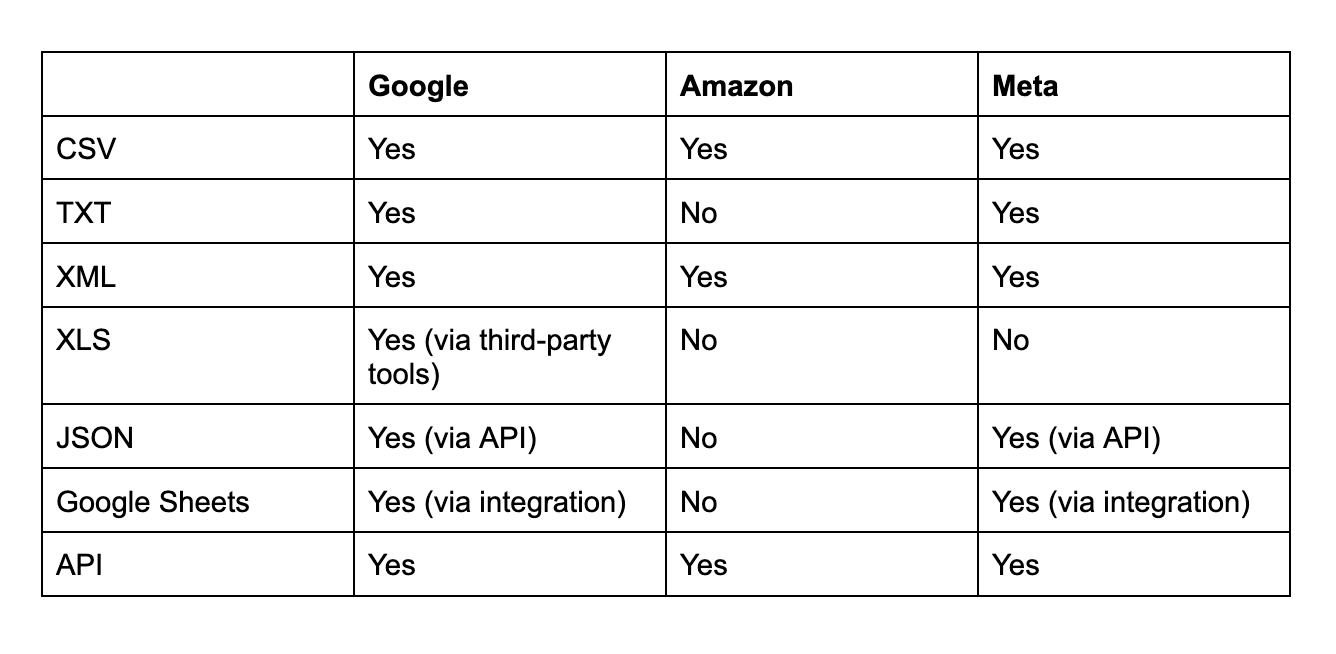
1. CSV (Comma-Separated Values)
- Common Uses: Frequently used in e-commerce platforms like Shopify and WooCommerce, or for uploading product data to Google Shopping or Facebook Ads.
- Advantages: Easy to create and edit using spreadsheet programs like Excel or Google Sheets. Widely accepted by many platforms.
2. XML (Extensible Markup Language)
- Common Uses: Commonly used for Google Merchant Center, Amazon, eBay, and other large marketplaces or comparison shopping engines (CSEs).
- Advantages: XML is flexible and allows for complex data structures, making it ideal for platforms that require detailed and organized product information.
3. TXT (Plain Text)
- Common Uses: Google Shopping accepts product feeds in a .txt format, especially for smaller or simpler data sets.
- Advantages: Simple to generate and easy to read, though it may not be as flexible or powerful as XML for complex data.
4. JSON (JavaScript Object Notation)
- Common Uses: Increasingly used for web applications, APIs, and custom data integrations for platforms such as Shopify, BigCommerce, or other custom solutions.
- Advantages: Well-suited for web-based applications and can handle complex product data structures in a lightweight, easily readable format.
5. XLS/XLSX (Excel Spreadsheet)
- Common Uses: Used primarily for internal data management or uploading product data to platforms that support Excel imports, like Shopify or certain feed management tools.
- Advantages: Provides the ability to add multiple sheets and perform advanced calculations or data manipulations before exporting as a feed.
6. Google Sheets
- Common Uses: Many e-commerce platforms and feed management tools integrate directly with Google Sheets to allow dynamic product feed updates.
- Advantages: Easy to collaborate on, and changes can be automated via scripts or tools, allowing for near real-time updates.
7. API (Application Programming Interface) Feeds
- Common Uses: Popular in dynamic, large-scale e-commerce operations where product data needs to be synced between systems (e.g., Shopify to Facebook, or a custom marketplace).
- Advantages: Real-time data updates and synchronization, eliminating the need for manual file uploads.
How to Optimize Your Product Feed
To gain the most reach and drive the most conversions, it’s important to optimize and maintain your product feed. Ensuring the accuracy of information included, adding rich search-worthy keywords, and including eye-catching imagery and videos in your product feed is essential for retailers and DTC brands.
- Accuracy: Include as many columns in your product feed as possible and keep all product details up-to-date to build trust and improve customer satisfaction. Conversion rates between ad creative and landing page will plummet if customers arrive on a PDP that doesn’t match the messaging seen in your new dynamic ad.
- Keywords: Understand the context in which your products might be discovered online and include terms your target audience is likely to search for to increase visibility. Is your product sustainable? Recommended by Oprah? Seen on Shark Tank? Make sure that’s in there!
- Images: Stand out from your competition and be sure to use compelling professional photos that showcase the product's features and attributes. Get creative with imagery to include backgrounds, iconography, and other branding elements that can set your visuals apart.
See how you can optimize your product feed and improve performance with our SKU Optimization tool here!
Turn Your Product Feed Into a Growth Lever
Your product feed isn’t just a backend file. It directly controls how your products show up, how they perform, and how far you can scale across channels. If your feed is incomplete or poorly structured, everything built on top of it underperforms.
The brands seeing the best results are treating their product feeds as a performance lever, not a maintenance task. They’re optimizing data, improving creative, and using feeds to drive better ads at scale. These resources are a good starting point, but the real impact comes from putting them into action.
If you want to get more out of your catalog without rebuilding your entire marketing stack, let’s book a demo with Marpipe and see how your product feed can actually drive results!
Frequently Asked Questions
How often should you audit and optimize your product feed?
At a minimum, you should review your feed weekly and monitor performance daily. If you’re running active campaigns, ongoing optimization is critical. Small changes to titles, images, or pricing can have a measurable impact on clicks and conversions. Treat your e-commerce feed like a live asset that needs continuous improvement, not a one-time setup.
As you enhance your feed with better visuals and messaging, it’s important to maintain consistency across your brand. This becomes more complex at scale, especially with dynamic ads. Here’s how to enrich product feeds without losing brand consistency while still improving performance.
What makes a “high-performing” product feed?
A high-performing feed is complete, accurate, and optimized for discovery. That means detailed titles with relevant keywords, high-quality images, consistent pricing, and as many attributes filled out as possible. It also aligns closely with your landing pages, so users see exactly what they expect after clicking. The more structured and enriched your data is, the better platforms can distribute it.
How do product feeds affect SEO and organic visibility?
While product feeds are mainly used for ads, they also influence organic visibility through platforms like Google Shopping and free listings. Well-optimized feeds help your products appear in search results, image results, and product carousels. If your feed includes strong keywords and accurate data, it increases your chances of showing up when customers search for products like yours.
Can product feeds support personalization and dynamic ads?
Yes. Product feeds are the foundation of dynamic ads, which automatically show relevant products to users based on their behavior. For example, if someone views a product but doesn’t buy, your feed enables platforms to retarget them with that exact product. This makes campaigns more relevant and improves conversion rates.
When should a brand invest in product feed optimization tools?
If you’re managing a growing catalog, running paid ads, or selling across multiple channels, it’s time to invest in tools. Manual processes break down quickly at scale. Feed optimization tools help automate updates, improve data quality, and unlock creative enhancements that would be difficult to manage manually.
